


Rashtriya Military School (RMS) has announced the entrance exam date for Common Entrance Exam 2025 (RMS CET 2025). RMS is the dream of many students. The wait is over. You can download your admit card from 1 December 2025. In this blog, you will get detailed information about how to download the RMS admit card.
Rashtriya Military Schools Exam Date 2025 Announced
The official RMS examination portal has released a new update regarding the Rashtriya Military Schools (RMS) Entrance Exam 2025. As per the latest notice published on 11 November 2025, the RMS exam for the Class 6 and Class 9 is now confirmed.
Official Notice Highlights
The notification states:
“The RMS examination will be OMR-based for Class 6 and Class 9 for the session 2026-2027, which will be conducted on 7 December 2025.
”The RMS admit cards will be available for download from 1st December 2025 onwards.”
Final Exam Date
Based on this announcement, all candidates and parents are informed that the RMS Entrance Exam 2025 will take place on 7 December 2025 for admissions to the 2026–27 academic session.
How to Download the RMS Admit Card 2025
Here is step-by-step information for downloading the RMS admit card for class 6 and class 9:
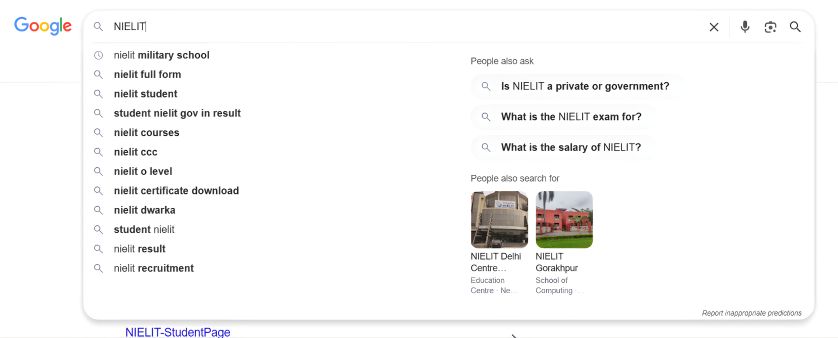
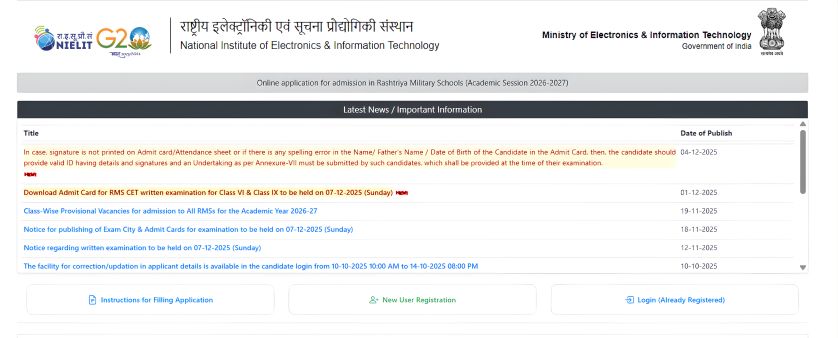
Step 1: Go to your browser and search for NIELIT Military School.
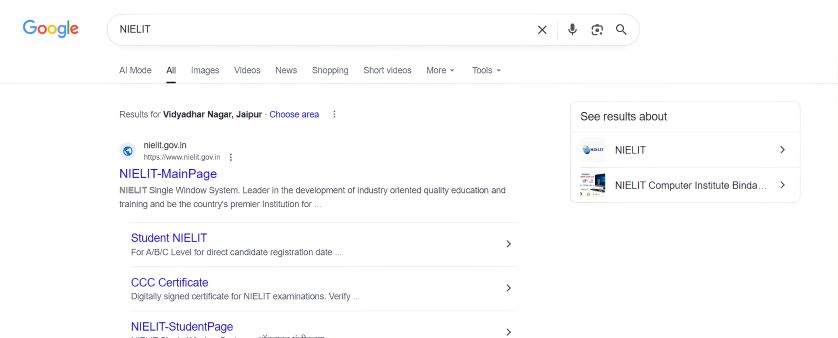
Step 2: Then, click on the first link which appears on your screen.
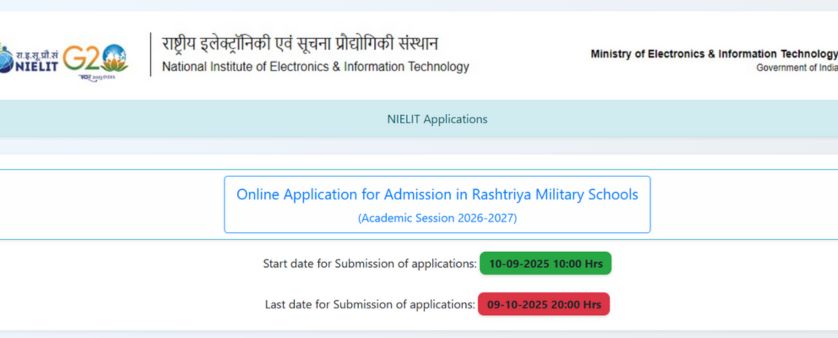
Step 3: After clicking on NIELIT, select the first option, “Online Application for Admission in Rashtriya Military Schools”.
Step 4: Look for the link labelled “Download admit card for RMS CET 2026 written examination for Class VI and Class IX" and click on it.
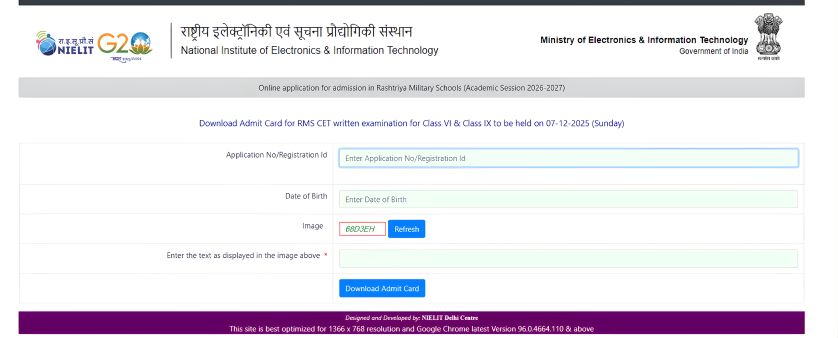
Step 5: Type your Registration Number/Application Number, Date of Birth (DOB), fill the CAPTCHA code shown in the above image and then click on “Download Admit Card”.
What Should You Do If Your RMS Admit Card Contains an Error
If you find a mistake in your admit card, like your name is misspelt, date of birth is incorrect, signature and your photograph are not clear, any spelling mistake in your name and your father’s name, your class is incorrect, the candidate must follow the following steps:
1. Act Immediately: Don’t wait for the exam day. Report the error as soon as you notice it.
2. Contact RMS Authorities: Reach out to the official helpline or email provided by RMS (NIELIT helpdesk/email).
3. Gather Required Documents: Keep scanned copies of:
- The original application form printout
- The admit card with the error
- A valid photo ID (Aadhaar, School ID, etc.)
4. Submit Your Request via Email: Send an email from your registered Email ID explaining your issue (e.g., name or DOB error) and attach the scanned documents.
5. Prepare an Undertaking if Needed: For signature mistakes or errors in name/DOB, you may be required to submit an Undertaking (Annexure-VII) at the exam centre confirming your correct details.
6. Verify Editable Fields: Make sure the correction you’re requesting (like Name, Father’s/Mother’s Name, DOB, Exam City) is among the fields allowed to be updated, as some details may be fixed.
You have to follow these steps because you can’t edit your admit card on your own, and mistakes in your admit card can lead to your disqualification.
Details Mentioned in RMS CET Admit Card 2026
When you download your RMS CET 2026 admit card, check the following details:
- Candidate’s Name – according to the application form
- Roll Number/Registration Number – unique exam ID
- Exam Date & Time – day and timings of the exam
- Exam Centre Details – name and address
- Class Applied For – Class VI or IX
- Photograph & Signature – for identity verification
- Important Instructions – items to carry, exam rules, and guidelines
Tip: Make sure to check all your details carefully. Any mistake in name, roll number, or exam centre should be reported immediately to the RMS authorities.
For any queries, you can contact us at:
Lakshya Academy
Jaipur – 9636961534
Patna - 8426961534
Lucknow - 9983161534
Stay prepared, mark your calendars, and make sure to download your admit card on time!


